Free Amazon ASIN grabber
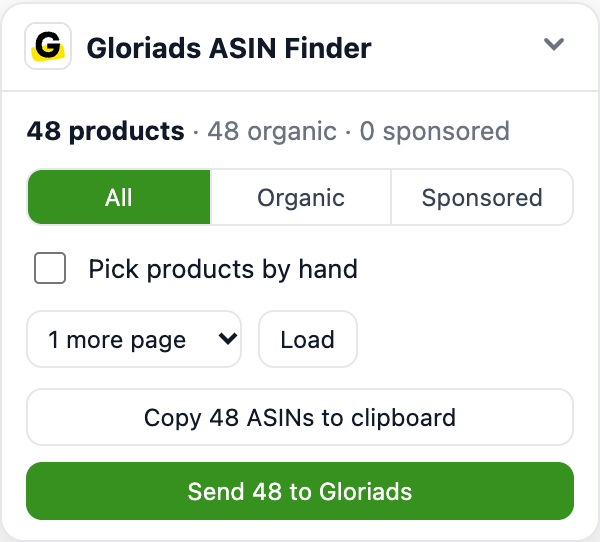
Search on Amazon as usual: the free Gloriads extension lists every product of the page with its ASIN, its organic position and whether it pays to appear. Pick them by hand or take them all, load the next pages, then copy them for your product targeting or send them to Gloriads.
- 100% free, no account
- Organic and sponsored told apart
- 23 Amazon marketplaces
- Never clicks an ad
Install the free Gloriads extension to grab ASINs
The ASIN grabber lives in the extension: it adds a panel to Amazon's results pages and best-seller lists. Free, no account needed to copy ASINs.
Works in Chrome, Edge, Brave, Opera and Arc. Already installed? Reload this page.
- 1Install the free extensionOne click in the Chrome Web Store. It works on the 23 Amazon storefronts, signed in to Amazon or not.
- 2Search on AmazonType a keyword or open a best-seller list: the panel counts the products, organic and sponsored, with their positions.
- 3Pick, copy or sendTake them all or click the ones you want, load the next pages, then copy the ASINs one per line or send them to Gloriads.
Frequently asked questions
An ASIN is the 10-character code Amazon gives every product (B08R5ZG89X). An ASIN grabber collects the ASINs of the products Amazon shows for a search or in a list, so you can target them in Sponsored Products, exclude them, or study them, without copying codes one by one from product pages.
The Gloriads ASIN grabber is part of the free Gloriads extension. It reads the page you are on, in your own browser, and adds what a copy and paste cannot give: each product's organic position, whether it is a paid placement, and in the Keyword & ASIN Finder, in how many of your searches it appears.
Install the extension, then search on Amazon as usual. The Gloriads panel appears at the bottom right of the results page:
- It counts the products of the page, organic and sponsored, and keeps the filter you pick: all, organic only or sponsored only.
- « Pick products by hand » puts a box on each product: click the ones you want, Shift + click to pick a range. Clicking picks; it never opens the product.
- « Load more pages » adds the next 1 to 4 result pages under the ones you see, with your filters and sort kept, a few seconds apart, like a shopper reading them.
- « Copy » puts the ASINs on your clipboard, one per line: the format of the « Enter list » box of Amazon Ads' product targeting.
- « Send to Gloriads » keeps them for the Keyword & ASIN Finder, where they become a Library list or product targets in a few clicks.
Yes. Each product is marked organic or sponsored from Amazon's own markers on the page, not from the word « Sponsored » in its text, which a product title can contain. Organic results get their position in the search, counted across the pages loaded; a sponsored product has no organic position on that search.
Products in sponsored carousels count as sponsored: an advertiser is paying to show them on that search right now. Amazon's own carousels (top rated, editorial picks) are left out, as they are not results of your search.
The ASINs your keywords bring up are the products your shoppers compare with yours:
- Target them in a Sponsored Products product-targeting campaign, to appear on their product pages.
- Exclude them as negative product targets where they waste your budget.
- In Gloriads, save them as a Library list or add them as product targets to your ad groups, on the marketplace they come from.
Yes, in the Keyword & ASIN Finder of the Gloriads app: type up to 50 keywords, or send those of the keyword tool, choose the marketplace and 1 to 5 result pages per keyword. The extension reads the pages from your own browser, in the background, without opening anything, and lists every product with its best organic position, its placements and the searches it appears in.
It reads at a shopper's pace: seconds between pages, longer between searches, a short break now and then. 10 keywords of 2 pages take about 11 minutes, and you can keep working meanwhile.
Yes: Best Sellers, New Releases, Movers & Shakers, Most Wished For and Gift Ideas. The panel takes the 50 ranks of the page at once, in rank order, even those Amazon has not drawn yet, and links the list's next page for ranks 51 to 100.
The 23 marketplaces where Amazon Ads runs, signed in to Amazon or not:
| Marketplace | Storefront |
|---|---|
| United States | Amazon.com |
| Canada | Amazon.ca |
| Mexico | Amazon.com.mx |
| Brazil | Amazon.com.br |
| United Kingdom | Amazon.co.uk |
| Germany | Amazon.de |
| France | Amazon.fr |
| Italy | Amazon.it |
| Spain | Amazon.es |
| Netherlands | Amazon.nl |
| Belgium | Amazon.com.be |
| Sweden | Amazon.se |
| Poland | Amazon.pl |
| Ireland | Amazon.ie |
| Türkiye | Amazon.com.tr |
| United Arab Emirates | Amazon.ae |
| Saudi Arabia | Amazon.sa |
| Egypt | Amazon.eg |
| South Africa | Amazon.co.za |
| India | Amazon.in |
| Japan | Amazon.co.jp |
| Australia | Amazon.com.au |
| Singapore | Amazon.sg |
Yes. The extension is free and copying ASINs needs no account. The Keyword & ASIN Finder, which reads many keywords at once and turns ASINs into Library lists or product targets, is part of the Gloriads app.
Never. Picking a product never opens it, and the pages it loads are shown without their ad links or tracking, so no advertiser pays for a click or a view because of it.
Chrome and every browser built on Chromium: Edge, Brave, Opera, Arc. It is installed from the Chrome Web Store.
No. It reads only the results pages you look at, or ask the Keyword & ASIN Finder to read: no order, no account page, no browsing history.
Other free tools
All free tools- Amazon keyword toolAmazon's search-bar suggestions from A to Z, collected live on 23 marketplaces, free and without an account.Open the tool
- ACOS calculatorYour ACOS, ROAS and TACoS from your ad spend and sales, and whether your ads make money.Open the tool
- ACOS to ROAS converterTurn an ACOS into a ROAS or a ROAS into an ACOS, with conversion tables and your break-even point.Open the tool
- Break-even ACOS calculatorThe highest ACOS your ads can reach before they lose money, and the target ACOS that keeps your profit.Open the tool
- TACoS calculatorWhat your ads cost the whole business, and how much of your sales comes from ads versus organic.Open the tool
- Bid and max CPC calculatorThe most a click can cost at your target ACOS, and the base bid to enter in Amazon.Open the tool
- Amazon FBA calculatorProfit, margin and ROI of one unit sold with FBA, and what is left once your ads are paid.Open the tool
- KDP ads calculatorThe ACOS and cost per click at which Amazon ads for a book break even, Kindle+ (formerly Kindle Unlimited) and series included.Open the tool
- Merch on Demand ads calculatorFrom a design's royalty, the most a click can cost and the ACOS at which your Merch ads break even.Open the tool
- Amazon Ads VAT calculatorHow much VAT or GST you lose on your Amazon ads each year, and whether registering gets it back, in 24 countries.Open the tool
- Quartile Cancellation CalculatorWhen your Quartile notice must arrive, when the contract ends, and what leaving today would cost.Open the tool
Join early access
Stop doing the math by hand
Gloriads watches your Amazon Ads campaigns and applies the rules you write: lower the bids above your target ACOS, add negatives for search terms that spend without selling, move the winners to exact match. Every change is explained, kept inside your limits, and one click from undo.
We'll email you once, when your invitation is ready. No spam.